Google News
Screenshots
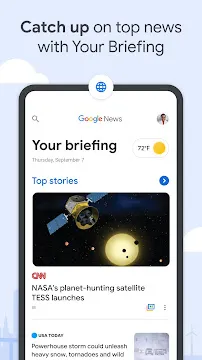

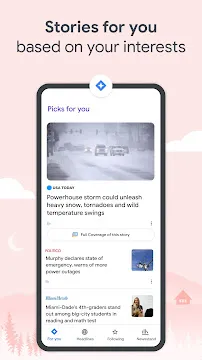
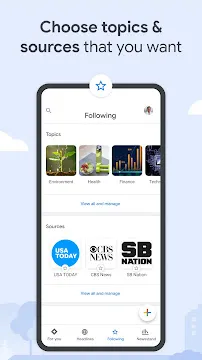
Google News provides a modern way to stay informed about the world through your Android device. This application organizes the vast amount of information available on the internet into a streamlined experience. It helps you find high-quality journalism from a variety of publishers while keeping the interface clean and easy to navigate. By using advanced technology, the app learns your preferences to highlight the stories that matter most to your daily life.
Personalized News Through the For You Tab
The For You tab acts as your primary starting point every time you open Google News. It provides a curated briefing that summarizes the most important headlines of the moment. This section focuses on a mix of global events and your personal interests to ensure you never miss a beat.
- Custom Briefings: You receive a short list of five stories that the app believes are essential for your day.
- Constant Updates: The feed refreshes throughout the day as new information becomes available.
- Tailored Content: The more you use the app, the better it understands which topics you prefer.
Using this tab allows you to catch up on the world in just a few minutes. Transitioning between stories is smooth, making it easy to skim through headlines or dive deep into a specific report.
Comprehensive Insights with Full Coverage
One of the standout features of Google News is the Full Coverage tool. This feature allows you to see how different news outlets report on the same event. Instead of seeing a single perspective, you get a 360-degree view of the story.
- Multiple Perspectives: You can read articles from various sources with different editorial viewpoints.
- Contextual Timeline: The app often organizes stories chronologically so you can see how an event developed.
- Diverse Formats: This section includes videos, local reports, and frequently asked questions about the topic.
This approach helps you build a well-rounded understanding of complex issues. Furthermore, it prevents the “filter bubble” effect by exposing you to different voices and opinions.
Following Your Favorite Topics and Sources
The Following section gives you complete control over your news feed. You can select specific topics, locations, and publishers that you want to track closely. This customization ensures that your news experience feels personal and relevant to your professional or hobbyist needs.
- Topic Tracking: Follow broad categories like technology or niche interests like space exploration.
- Local Updates: Add your city or hometown to get news from your immediate community.
- Source Management: You can prioritize your favorite newspapers or hide sources you do not trust.
By actively managing these settings, you turn Google News into a specialized tool for your information needs. It ensures that the content you see aligns with your values and interests.
Google News: Discovering New Content in the Newsstand
The Newsstand tab is the place where you can find new publications to read. It organizes magazines and digital-first outlets into easy-to-browse categories. You can subscribe to premium content or explore free articles from sources you might not have discovered yet.
- Category Browsing: Explore sections like health, science, entertainment, and sports.
- Premium Access: Some publishers offer paid subscriptions directly through your Google account.
- Visual Layout: The design uses large images and clear text to make browsing enjoyable.
As you explore the Newsstand, you can easily add new interests to your profile. Consequently, your main feed becomes even more diverse and interesting over time.
Local News for Your Community
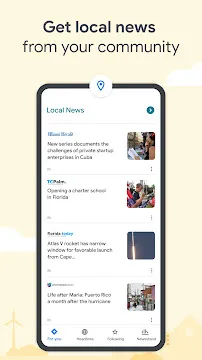
Staying connected to your local area is easy with the dedicated Local features. Google News uses your location data to surface stories from local newspapers, radio stations, and blogs. This keeps you informed about school board meetings, local weather alerts, and neighborhood events.
- Multiple Locations: You can follow news for your current city and other places where your family lives.
- Hyper-local focus: Small publishers get visibility alongside national giants.
- Community Impact: These stories help you understand the issues affecting your immediate surroundings.
Having this information at your fingertips fosters a stronger connection to your community. It bridges the gap between massive global events and the things happening right outside your door.
Optimizing Your Experience with Settings
You can adjust the application to fit your specific reading habits. The settings menu offers several ways to change how the app looks and how much data it uses. These adjustments make the app accessible for everyone, regardless of their device or internet speed.
- Data Saver Mode: Turn this on to reduce data usage when you are on a limited mobile plan.
- Dark Theme: Switch to a darker interface to make reading more comfortable at night.
- Notification Controls: Choose how often the app alerts you about breaking news.
Adjusting these features ensures that the app remains a helpful part of your day rather than a distraction. Consequently, you can enjoy a seamless reading experience that matches your lifestyle.
Final Thoughts
Google News for Android is a powerful tool for anyone who wants to stay informed without feeling overwhelmed. It balances automated personalization with human-led journalism to provide a balanced view of the world. With its clean layout and intuitive features, the app makes it easy to find high-quality information. Whether you want a quick morning briefing or a deep dive into a global crisis, this application provides the necessary tools. It remains a reliable companion for navigating the modern information landscape.